Educators and trainers
You turned a textbook chapter or a pile of readings into slides with NotebookLM. Before class you want to rename a few slides, add your school's name, and shuffle the order. That takes real text boxes, not pictures of them.
Already have an editable NotebookLM PPTX? Use it directly. NotebookLM offers PDF and PPTX downloads. Open the PPTX and check the text and objects you need to change. If those are part of a slide image, Image2PPT rebuilds text, shapes, and tables with high fidelity. Upload a PDF or image; PPTX files are not accepted directly.
You turned a textbook chapter or a pile of readings into slides with NotebookLM. Before class you want to rename a few slides, add your school's name, and shuffle the order. That takes real text boxes, not pictures of them.
NotebookLM turned your research into a 20-slide deck, and the client meeting is tomorrow. You need to reword the takeaways in your own voice, update a couple of figures, and pull in slides from your team's deck. If the wording and figures you need to change are part of an image, convert those pages to edit them.
You draft webinars and course outlines in NotebookLM and revise them often. A quick wording fix or a pass to match your brand colors shouldn't mean rebuilding slides from scratch. In the converted deck, every rebuilt element can be selected and edited on its own.
| Input | Limit | Notes |
|---|---|---|
| NotebookLM PDF export | 35 MB per file, up to 50 pages per job | Type a page range (like 1-5) to convert only the slides you need; each page uses one credit. |
| Slide screenshot (PNG, JPG, WebP, GIF) | 35 MB per file, up to 50 per job | Handy when you only need to fix one or two slides. |
| Multiple files at once | Up to 50 pages per job (PDF pages + images combined) | Mix images and PDFs in one batch; everything comes back as a single PPTX. |
| Languages | English, Chinese (Simplified and Traditional), Japanese, Korean, major European languages | Right-to-left scripts such as Arabic and Hebrew are supported too. |
Titles, body paragraphs, bullet lists, KPI cards, table cells with numbers and labels, roadmap steps, callout shapes, arrows between blocks, two-column comparisons. These become text boxes, shapes, and tables you can click and edit in PowerPoint, Google Slides, or Keynote.
Photos, detailed decorative icons, hand-drawn flowcharts, busy bar/line/pie charts with overlapping labels, watermarks, and patterned backgrounds. These stay in place as images you can resize and move, rather than being redrawn as shapes.
Open your NotebookLM PPTX and try changing the text or objects you actually need. Expand any groups if necessary. A whole slide being selected can also mean the objects are grouped; check whether the required content is an image before deciding to rebuild it. If it is already editable, use the PPTX directly.
When the content you need is an image, download the PDF from NotebookLM or save your PPTX as a PDF. In PowerPoint, choose File → Export → Create PDF; in Google Slides, choose File → Download → PDF. Upload that PDF and every page comes back as its own editable slide, in the same order as your NotebookLM deck.
Only need to fix two or three slides? Screenshots work just as well. For a long deck, type a page range after upload (like 3-8) so you only spend credits on the slides you'll actually use.
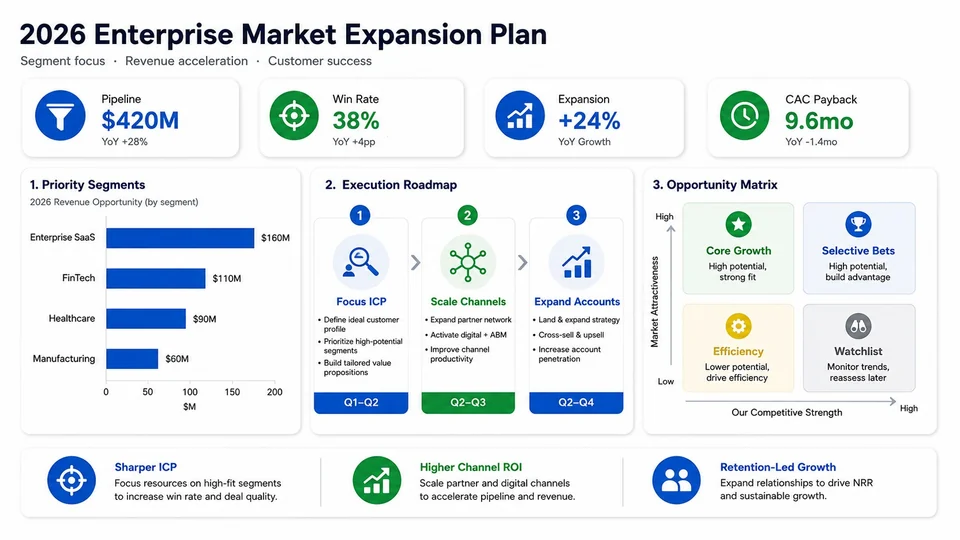
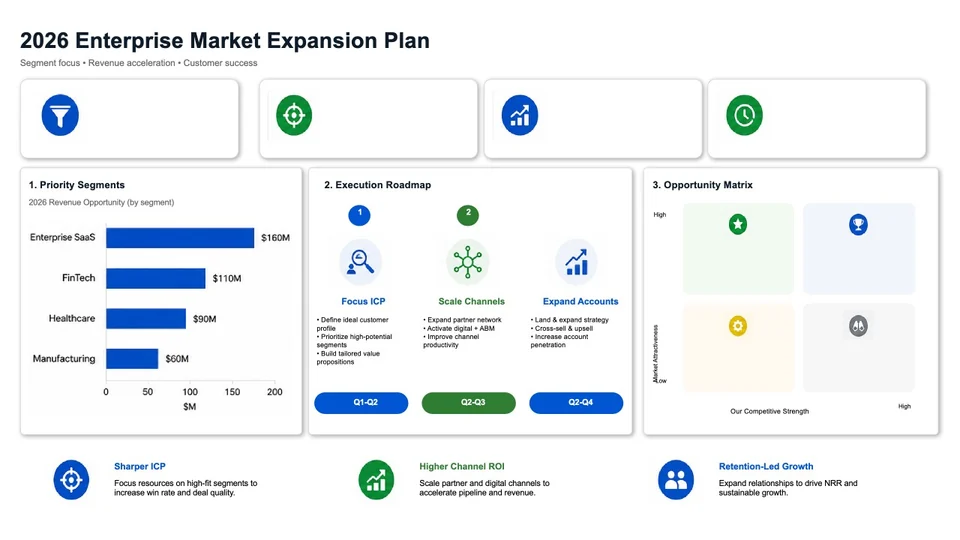
This general Image2PPT conversion demo uses an AI-generated slide. The left image is the source; the right is a generated preview of the corresponding PPTX. Download the sample to inspect the reconstructed text and shapes.
Pay as you go, no subscription: one credit converts one slide, and purchased credits never expire. Pick from three packs: 30 credits for $5.99, 80 for $11.49, or 200 for $24.99 — roughly $0.20, $0.14, or $0.12 per slide. Pay by card in USD. New users get free credits on first sign-in, valid for 7 days. See full pricing →
| Image2PPT | Use the downloaded PPTX | Rebuild by hand | |
|---|---|---|---|
| Best fit | The content you need is an image | The content you need is already editable | A simple slide or a small change |
| Input | PDF or slide images | The original PPTX | Your source material |
| Editing | Edit reconstructed text, shapes, and tables | Edit the objects already in the file | Create and edit your own objects |
| Layout and colors | Reproduced with high fidelity | Keep the downloaded deck | Arrange them yourself |
If the text on that slide is part of an image, it cannot be edited as a text box. First check the objects you need in PowerPoint, including any groups. If the text is already editable, use the file directly; if it is in an image, download a PDF or save the PPTX as a PDF for conversion.
Yes. Google’s slide deck help describes Revise and regenerating the slides, as well as PDF and PPTX downloads. You can make changes there before downloading. For changes in PowerPoint, first check whether the required objects in the downloaded PPTX are editable.
Upload the PDF as it is, no image conversion needed. One job handles up to 50 pages, and each page uses one credit. Only need part of the deck? Type a page range (like 3-8) and the other pages cost nothing.
Image2PPT takes PDFs and images (PNG, JPG, WebP, GIF), so save the PPTX as a PDF first: File → Export → Create PDF in PowerPoint, or File → Download → PDF in Google Slides. Upload that PDF and the slides come back in the same order.
Yes. You get a standard PPTX file that opens in Microsoft PowerPoint, Google Slides, Apple Keynote, and LibreOffice Impress, and the editable parts stay editable.
English, Chinese (Simplified and Traditional), Japanese, Korean, and major European languages are fully rebuilt as editable text. Right-to-left scripts such as Arabic and Hebrew, and unusual typefaces, are supported too; anything that can't be read cleanly stays in place as an image.
Uploaded slide images and PDFs are processed on Image2PPT's servers, and both the originals and the converted PPTX are kept until you delete them or close your account. A few exceptions apply — images uploaded through a plugin, or for a complex page on a free account, are deleted 7 days after upload (whether or not they were converted; the generated PPTX is kept), and there are separate rules for enterprise API results, uploads whose conversion never started, and clearing older files when storage runs short. The privacy policy sets them all out. Files are not used to train any model.
Yes. New users get free credits on first sign-in, valid for 7 days, so you can convert a few slides and see the result before buying a credit pack. There's no subscription, and purchased credits never expire.
Yes. Up to 50 pages per job (PDF pages and images combined), merged into a single PPTX. Conversion runs in the background, so feel free to close the tab — the result waits in the task list until you delete it, apart from the few exceptions listed in the privacy policy.
Yes. The public Image2PPT API accepts NotebookLM PDFs or exported slide images and converts them asynchronously into editable PPTX files.
Upload a screenshot, PDF, or AI slide image and download a PowerPoint you can edit right away. New users get free credits to try it.
Convert an image nowIf your PDF is a report or a contract, not a deck, turn it into editable Word.