Marketers
Canva makes a good-looking slide fast. Then sales asks for it in PowerPoint so they can update the numbers every quarter. A picture can't do that. A rebuilt deck with editable text and tables can.
The design is done. The last step is where it gets stuck. You built the slides in Canva, and now they need to live in PowerPoint: your manager wants to tweak the wording, or the client's team only works in Office. Download a PNG or JPG and every word is baked into the pixels. Try Canva's own PPTX export and it often opens with missing fonts and elements locked into groups. Drop the image or PDF into Image2PPT and you get back a PowerPoint file with real text boxes, shapes, and tables.
Canva makes a good-looking slide fast. Then sales asks for it in PowerPoint so they can update the numbers every quarter. A picture can't do that. A rebuilt deck with editable text and tables can.
Canva templates make lesson slides and class presentations look polished, but the download is an image. Swapping the example for next period or fixing a typo the night before you present should mean clicking and typing, not redesigning.
The client signed off on your Canva mockup, then asked for "a PowerPoint version so we can make small changes." Send them an editable PPTX and the next round of tweaks happens on their side, not in your inbox.
| Source | How to get it | Notes |
|---|---|---|
| Canva PNG / JPG export | In Canva, Download → PNG or JPG | PNG is the better pick for sharper text. |
| Canva PDF export | In Canva, Download → PDF | Upload it as is. Each page becomes one slide. |
| Screenshot of a Canva presentation | One screenshot per slide | One design per image gives the best result. |
| Multi-page designs | Up to 50 pages per conversion | Merged into a single PPTX. |
Headlines, body paragraphs, bullet lists, numbers, table cells with labels and values, simple shapes (rectangles, rounded boxes, callouts), arrows connecting blocks, two-column comparisons, captions. Open the file in PowerPoint, Google Slides, Keynote, or WPS and each one is text or a shape you can click and change.
Photo backgrounds, illustrated characters, hand-drawn or complex decorative icons, busy charts with overlapping labels, watermarks, gradient or stylized backgrounds. These stay as embedded images, so you can move and resize them, but not redraw individual strokes.
What Canva gives you when you download a PNG is basically a photo of your slide. The letters are colored pixels, not text, so there's nothing in PowerPoint for your cursor to grab. The PPTX export tries to keep things editable, but missing fonts and elements that arrive flattened or locked into groups often get in the way.
Image2PPT reads the image and builds the slide again. It works out what each piece is and where it sits (a line of text here, a shape there, a table below), then on a fresh slide it types the text into text boxes, draws the shapes as PowerPoint shapes, and rebuilds the tables as PowerPoint tables. Nothing is pasted in as one big picture, so once the file opens you can click, edit, and move each element.
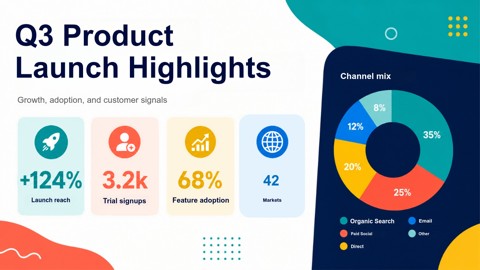
Here's a design image run through the same steps you'd use for a Canva export. On the left is the source image, a flat picture. On the right is a preview of the editable PPTX: the rebuilt text, shapes, and table cells can all be clicked and changed in PowerPoint.

Pay as you go, no subscription. One credit converts one page, and purchased credits never expire. Three packs, paid by card: 30 credits for $5.99 (about $0.20 a page), 80 for $11.49 (about $0.14), or 200 for $24.99 (about $0.12). New users get free credits on sign-in, valid for 7 days. See full pricing →
Download your design from Canva as a PNG or JPG (or a PDF for multi-page designs) and upload it to Image2PPT. The words in that image are just pixels, so PowerPoint has nothing to edit. Image2PPT reads the image and rebuilds the text, shapes, and tables as native PowerPoint elements, so you can click in and start typing.
It often opens in PowerPoint with missing fonts and with elements flattened into images or locked into groups, so a one-word change starts with ungrouping things. Downloading the design as an image and rebuilding it with Image2PPT gives you a clean deck where every element can be edited on its own.
PNG, JPG, WEBP, GIF, and PDF, up to 35MB per file. A Canva PDF works as is, and each page becomes one slide. If you use images, PNG keeps text sharpest, and one design per image works best.
Yes. Each conversion handles up to 50 pages and merges them into a single PPTX. Each page uses 1 credit, and purchased credits never expire.
Colors and layout come back with high fidelity. Fonts are mapped to common PowerPoint fonts such as Calibri and Arial. The text stays fully editable, so switching back to your brand font takes a couple of clicks.
Yes. New users get free credits when they sign in, valid for 7 days, so you can try it on your own Canva designs before buying a pack. No subscription, and purchased credits never expire.
Upload a screenshot, PDF, or AI slide image and download a PowerPoint you can edit right away. New users get free credits to try it.
Convert an image now