Convert NotebookLM PDF slides into editable PowerPoint
NotebookLM's PPTX export is an image layer. Every slide is a flattened bitmap embedded in a PPTX wrapper — you can present it, but you cannot click into a paragraph and change a word, recolor a shape, or edit a table cell. Image2PPT fixes that by rebuilding each NotebookLM slide as native PowerPoint elements: real text boxes, real shapes, real tables. Drop in a NotebookLM PDF or screenshot, get back a deck you can actually edit.
🎁
Free credits on first sign-in — convert a few NotebookLM pages before you decide.
Who this is for
Educators and trainers
You ask NotebookLM to summarize a textbook chapter or research paper into slides. The deck looks great, but you want to retitle slides, swap your school's branding, and reorder pages — all of which require real editable elements.
Analysts and consultants
You feed reports into NotebookLM and get back a 20-slide deck. To take it to a client meeting you need to restate numbers in your own voice, redraw two charts as tables, and merge in slides from another deck. Image-layer PPTX cannot do that.
Content creators and course builders
You use NotebookLM to draft webinars or course outlines. Each iteration needs a quick text edit and a brand-consistent color pass. Image2PPT gives you back a deck where the rebuilt elements are selectable.
Supported inputs
| Input |
Limit |
Notes |
| NotebookLM PDF export |
50 pages per file |
Select a page range to convert only what you need; each page is one credit. |
| Slide screenshot (PNG, JPG, WebP) |
35 MB per file, up to 50 per batch |
Useful when you only want a single slide from a large deck. |
| Multiple files at once |
Up to 50 slides per job (PDF pages + images combined) |
Mixed images and PDFs supported in a single batch. |
| Languages |
English, Chinese, Japanese, Korean, major European |
Right-to-left scripts handled best-effort. |
What gets reconstructed vs kept as image
Reconstructed as native PPT elements
Titles, body paragraphs, bullet lists, KPI cards, table cells with numbers and labels, roadmap steps, callout shapes, arrows between blocks, two-column comparisons. These become text boxes, shapes, and tables you can click and edit in PowerPoint, Google Slides, or Keynote.
Kept as image (best-effort)
Photographs, complex decorative icons, hand-drawn flowcharts, dense bar/line/pie charts with overlapping labels, watermarks, and stylized background patterns. These remain as embedded image elements you can resize and move but not redraw.
How it works
- Export from NotebookLM — use NotebookLM's built-in "Export to PowerPoint" (which produces the image-layer PDF/PPTX) or screenshot specific slides you want. Both work as input here.
- Upload to Image2PPT — drop the file at image2ppt.com/en. New users get free credits on first sign-in, enough to test a few pages.
- Download the editable PPTX — open it in PowerPoint, click any text box, edit it. The rebuilt shapes, tables, and bullets are real PowerPoint objects where possible. No flattened images locked under transparent overlays.
Turn a NotebookLM slide deck or PPTX into editable slides
If you downloaded a NotebookLM slide deck as a PPTX, you have probably seen it already: each slide opens as one picture. Clicking a title selects the whole slide, and there is no text to change. That is the file you want to rebuild.
Image2PPT takes PDFs and images, so the quickest route for a NotebookLM PPTX is to save it as a PDF first. In PowerPoint, choose File → Export → Create PDF; in Google Slides, choose File → Download → PDF. Upload that PDF and every page comes back as its own editable slide, in the same order as your NotebookLM deck.
If you only need two or three slides, screenshots work just as well. For a long deck, use the page range picker after upload so you only spend credits on the slides you plan to reuse.
What the output looks like
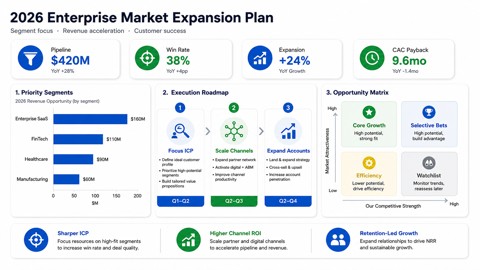
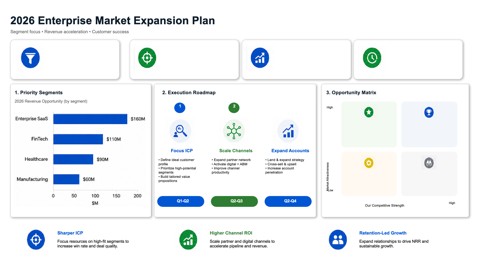
The slide below was rebuilt from an AI-generated PDF in the same workflow you would use for NotebookLM. The left image is the source; the right image is the editable PPTX preview — the rebuilt elements on the right can be clicked and modified in PowerPoint where possible.
Pricing
Pay-as-you-go, no subscription. One credit converts one slide. Purchased credits remain valid long-term. Three tiers: $5.99 USD for the smallest pack, scaling to $24.99 USD for the largest. New users get a free trial allowance on first sign-in. See full pricing →
Image2PPT vs NotebookLM native export vs other tools
|
Image2PPT |
NotebookLM native PPTX export |
Free OCR / image-to-PPT tools |
| Real editable text boxes |
Yes |
No (image layer) |
Partial (text fragments only) |
| Real editable shapes & tables |
Yes |
No |
No |
| Multilingual support |
Yes (EN, CN, JP, KR, EU) |
Yes |
Varies |
| Output quality on AI-generated layouts |
High |
Visual only — looks right, cannot be edited |
Low — broken layouts common |
Frequently asked questions
Why is NotebookLM's PPTX export not editable?
NotebookLM renders each slide as a single flattened image and wraps it in a PPTX. PowerPoint opens the file and shows the slides, but the text is locked inside the bitmap. You cannot click into a paragraph and change a word, recolor a shape, or edit a table cell.
Does NotebookLM plan to add an editable export?
Not announced as of May 2026. The PPTX export feature shipped on 2026-02-18 with the image-layer format. Until Google ships element-level export, third-party tools like Image2PPT are the way to get truly editable PowerPoint output from NotebookLM.
Can I upload a NotebookLM PDF directly, or do I have to convert it to images first?
Upload the PDF directly. Image2PPT accepts PDF files up to 50 pages and converts each page as one credit. You can select a page range if you only want part of the deck.
How is the output different from CopySlides or DeckEdit?
Image2PPT and CopySlides both rebuild slides as native PowerPoint elements rather than embedding images. Their pricing models differ and change over time, so check each site for current prices; Image2PPT is pay-as-you-go with no subscription, and purchased credits remain valid long-term. Free tools like DeckEdit use lighter OCR and typically leave text as fragmented chunks rather than complete editable text boxes.
Does the converted PowerPoint open in Google Slides?
Yes. The output is a standard PPTX file. Microsoft PowerPoint, Google Slides, Apple Keynote, and LibreOffice Impress all open it with the editable elements intact.
What languages does it support?
English, Chinese, Japanese, Korean, and major European languages are supported with full text reconstruction. Right-to-left scripts and rare typefaces are handled best-effort and may fall back to image preservation when the model is uncertain.
What happens to uploaded files? Are they used to train models?
Uploaded slide images and PDFs are processed on Image2PPT's servers, and both the originals and the converted PPTX are kept until you delete them or close your account. A few exceptions apply — the working copy that makes a re-run possible is reclaimed 7 days after upload, and there are separate rules for enterprise API results, uploads whose conversion never started, re-runs replacing their own previous result, and clearing older files when storage runs short. The privacy policy sets them all out. Files are not used to train any model.
Is there a free trial?
Yes. New users get free credits on first sign-in (valid for 7 days) — enough to convert several slides before deciding whether to purchase a credit pack. There is no subscription and purchased credits remain valid long-term.
Can I batch-convert a whole NotebookLM deck?
Yes. Up to 50 slides per job (PDF pages and images combined). Conversion runs in the background; you can leave the page and return — the result waits in the task list until you delete it, apart from the few exceptions listed in the privacy policy.
Is there an API for NotebookLM-to-PowerPoint conversion?
Yes. The public Image2PPT API accepts NotebookLM PDFs or exported slide images and converts them asynchronously into editable PPTX files.
Turn your slide image into an editable PPTX
Upload a screenshot, PDF, or AI slide image and download a PowerPoint you can edit right away. New users get free credits to try it.
Convert an image now
Last updated 2026-05-17. Image2PPT is actively maintained — file format support, model quality, and FAQ entries are refreshed based on user reports.