Image2PPT,
images to editable PowerPoint
Image2PPT, images to editable PowerPoint
Convert screenshots, PDF pages, and AI-generated slide images
into native PowerPoint text, shapes, and tables you can edit.
Screenshots, PDFs, and AI images to editable PowerPoint
Images to editable PowerPoint: original → editable elements


Real PowerPoint elements, not flattened images
Rebuilt text boxes, shapes, and tables are native PPT objects — click, edit, recolor, rearrange. Like it was your own deck from the start.
Works with screenshots, PDFs, and AI-generated slide images
AI slide images from ChatGPT, Gemini, NotebookLM, or Doubao. Screenshots of your own existing deck. PDF pages. Clean, structured layouts work best.
Per-page PDF, credits remain valid long-term
50-page PDF but only need 5 slides? Pick the pages. Pay for 5. No subscription. Credits remain valid long-term.
Common slide sources, and how to convert each
Pick the guide that matches your input.
What AI slide generation has solved—and what remains
Real examples, technical judgment, and practical editable-PowerPoint reconstruction.
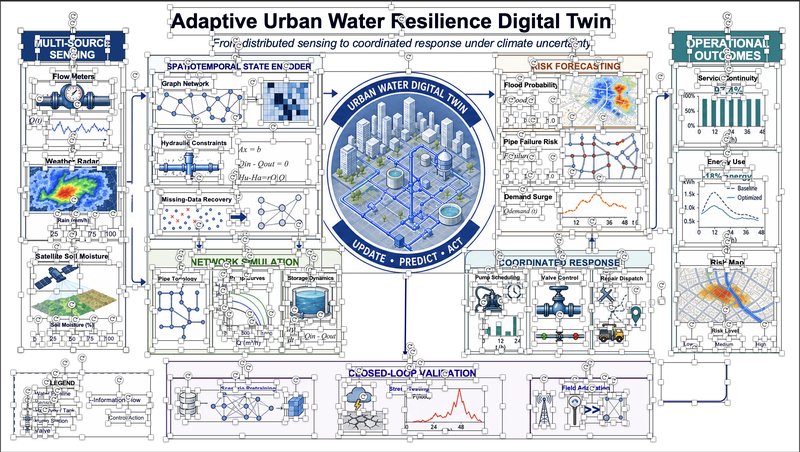
AI Has Solved Slide Design. The Last Mile Is Editability.
Three AI slide approaches, and how one difficult image became 165 PowerPoint objects.
How to Convert a Slide Screenshot into an Editable PowerPoint
Why real image-to-PPT conversion is object reconstruction, not a new file extension or an OCR overlay.
Quick check before you upload — what works best
Clear slide screenshots, PDF pages, and structured layouts work best. Complex posters and hand-drawn flowcharts are handled best-effort.
