Which AI images fit best?
Clear, front-facing 16:9 slide images work best — especially reports, KPI dashboards, lesson slides, consulting-style pages, roadmaps, tables, and quarterly reviews.
Use GPT-Image, Gemini, Midjourney, Doubao, or any AI image model to generate a high-quality slide image, then use Image2PPT to convert it into editable PowerPoint. AI handles the visual creation; Image2PPT turns the image into a PPTX your team can keep editing and shipping.
Clear, front-facing 16:9 slide images work best — especially reports, KPI dashboards, lesson slides, consulting-style pages, roadmaps, tables, and quarterly reviews.
AI images look great, but you cannot edit the text, change the numbers, or reuse the slide. Once it is PPTX, your team can keep editing, presenting, and delivering.
Text, cards, tables, and structured layouts become editable elements first. Complex icons, backgrounds, and decorative graphics may stay as images when needed.
The English growth-plan slide below was first generated by an image model, then converted through Image2PPT's real pipeline into PPTX and the preview shown on the right.
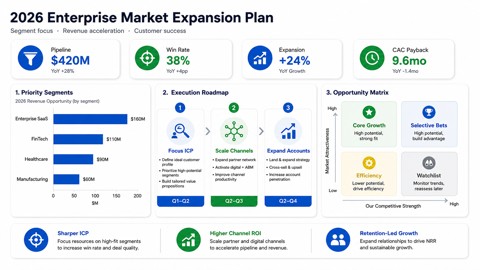
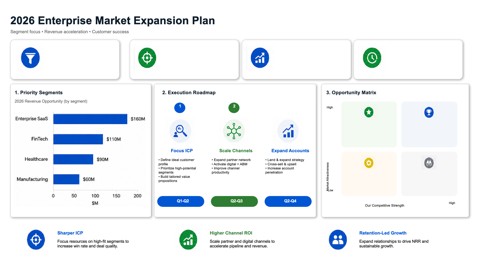
Describe a business slide in GPT-Image or any image model: title, KPIs, charts, tables, roadmap, and brand colors.
Drop the PNG / JPG / WebP into Image2PPT. PDFs and image-only PPT exports also work.
Open the editable PowerPoint and keep iterating on copy, data, structure, and details — instead of rebuilding the slide on top of an image.
Yes. As long as the screenshot is clear, the text is readable, and the layout looks close to a real business slide, Image2PPT can convert it to PPTX.
Yes. Image2PPT processes images and PDF pages — it does not depend on which model produced the image. Quality mostly depends on the screenshot's clarity and layout.
Image2PPT does not just paste the image into a slide. It reconstructs text, cards, charts, tables, and business layouts so the file stays editable.
Yes. Image2PPT is also written as img2ppt or image2ppt; the official site is image2ppt.com. Other similarly named websites are not affiliated with us — look for the domain image2ppt.com.