Founders building pitch decks
You iterate slide concepts in ChatGPT for speed. Once you find one that works, you need real numbers, real brand colors, and a real deck to send investors — not a flattened concept image.
ChatGPT slides are flat pictures. When you ask ChatGPT, GPT Image 2, GPT-Image, or DALL-E to make a slide, the result is a single PNG or JPG — every pixel is baked in. The text looks real but cannot be clicked, the shapes look real but cannot be moved, the table looks real but cannot be edited. Image2PPT fixes that: drop the ChatGPT slide image in, get back a PowerPoint file where readable text and structured slide elements are rebuilt as editable content when possible.
You iterate slide concepts in ChatGPT for speed. Once you find one that works, you need real numbers, real brand colors, and a real deck to send investors — not a flattened concept image.
You generate campaign concept slides in ChatGPT to show stakeholders. Every round needs edits — change the metric, swap the call-to-action, adjust the headline. Image-locked slides break that loop.
You use ChatGPT to draft visual aids fast, then localize them per class: change examples, translate labels, replace logos. Editable elements are mandatory for this workflow.
| Source | How to capture | Notes |
|---|---|---|
| ChatGPT image response (GPT Image 2 / GPT-Image) | Right-click → Save image, or download from the conversation | PNG is preferred — sharper text edges. |
| ChatGPT Canvas slide | Screenshot the slide area (full window or selection) | One slide per screenshot for best results. |
| DALL-E 3 standalone output | Save the image from the DALL-E or ChatGPT interface | Same pipeline as GPT Image responses. |
| OpenAI API image response | Save the bytes returned by the API to a PNG/JPG file | Upload the resulting file. |
| Batch (multiple slides) | Drop up to 50 images at once | Image2PPT assembles them into a single PPTX deck. |
Headlines, body paragraphs, bullet lists, KPI numbers, table cells with labels and values, simple shapes (rectangles, rounded corners, callouts), arrows connecting blocks, two-column comparisons, captions. Every item becomes clickable text or a clickable shape in PowerPoint, Google Slides, and Keynote.
Photographic backgrounds, illustrated characters, hand-drawn or complex decorative icons, busy charts with overlapping labels, watermarks, gradient or stylized backgrounds. These remain embedded image elements — you can move and resize them, but not redraw individual strokes.
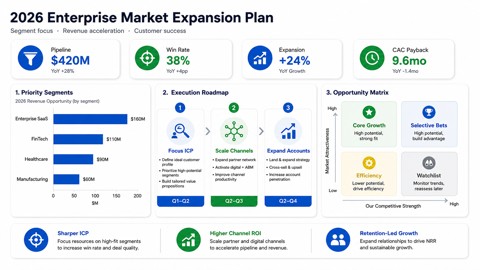
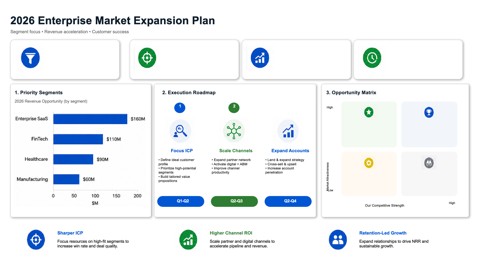
Below is an AI-generated slide image converted through the same workflow you would use for a ChatGPT, GPT Image 2, or GPT-Image output. The left image is the source bitmap; the right image is a preview of the editable PPTX. Main text and structured slide elements can be selected and modified in PowerPoint when reconstruction succeeds.
Pay-as-you-go, no subscription. One credit converts one slide image. Credits remain valid long-term. Three tiers: $4.99 USD for the smallest pack, scaling to $22.99 USD for the largest. New users get a free trial allowance on first sign-in. See full pricing →
| Image2PPT | ChatGPT direct image | MagicSlides / PPT.AI (text prompt → deck) | |
|---|---|---|---|
| You already have a slide image you like | Yes — exact match | You have the image but cannot edit it | Not designed for this — they generate fresh decks |
| Real editable text boxes | Yes | No (flat image) | Yes (their generated decks) |
| Preserves the ChatGPT visual you liked | Yes — rebuilds the same layout | Image is the source | No — generates a new layout |
| Multilingual support | EN, CN, JP, KR, EU languages | Limited by the image model | Varies by tool |
| Pricing model | Pay-as-you-go, credits remain valid long-term | Included in ChatGPT plan | Monthly subscription |
ChatGPT's slide outputs are generated by an image model such as GPT Image 2, GPT-Image, or DALL-E. The result is a single bitmap — text is rendered as pixels, not stored as text. PowerPoint cannot click into pixels. Image2PPT is the missing step that reads the image and rebuilds editable elements.
Yes. Screenshot the Canvas slide and upload that PNG to Image2PPT. The pipeline is identical to handling a direct GPT Image response.
Same workflow. Image2PPT accepts any PNG, JPG, or WebP of a slide-like image regardless of which OpenAI model produced it.
Yes. Drop up to 50 images at once. Image2PPT processes each slide and assembles them into a single PPTX deck. One credit per slide; credits remain valid long-term.
Colors are preserved faithfully. Fonts are mapped to standard PowerPoint/Office fonts (Calibri, Arial, Microsoft YaHei, SimSun). Once the PPTX opens you can swap to any font in your library.
Yes. The output is standard PPTX. PowerPoint, Google Slides, Keynote, and LibreOffice Impress all open it with editable elements intact.
Files are processed on Image2PPT's servers, the converted PPTX is held for 30 days, and both inputs and outputs are deleted afterwards. Files are not used to train any model.
No, complementary. MagicSlides and PPT.AI generate decks from a text prompt. Image2PPT rebuilds an existing slide image. Many users generate visuals in ChatGPT (the prompt-to-image step), then run them through Image2PPT to make them editable — both tools fit different stages of the workflow.
Yes. New users get free credits on first sign-in. Enough to convert a few ChatGPT slides and decide whether to buy a credit pack. No subscription. Credits remain valid long-term.
Yes. The public Image2PPT API can batch-convert ChatGPT-generated images into editable PPTX files. There is no ChatGPT-specific plugin yet.