AI Has Solved Slide Design. The Last Mile Is Editability.
For years, “AI presentation maker” meant a tool that could arrange a title, a few bullet points, and some stock imagery faster than a person. The result was usable, but it rarely felt designed. Image-generation models have changed that. They can now compose a dense systems diagram, an illustrated lesson, a cinematic product launch, or a comic-style explanation as a single coherent slide image.
That makes slide design feel close to solved. There is one stubborn problem: the most visually capable systems usually return a picture. It may look excellent, but the title is pixels, the chart labels are pixels, and the cards cannot be moved. The design is finished; the PowerPoint work is not.
Our view: the strongest AI slide workflow is increasingly image first, editable PowerPoint second. Let image models handle unrestricted visual composition, then reconstruct the result into objects people can actually revise and deliver.
Three ways the industry generates slides
Most AI presentation products follow one of three approaches. Each is useful, but each optimizes for a different constraint.
| Approach | What it does well | Where it struggles |
|---|---|---|
| Generate PPTX directly | Produces native, editable files from the start. | Complex visual intent must be translated into coordinates, shapes, fonts, and layout instructions. Free-form illustration and dense composition are difficult to express reliably with standard PowerPoint primitives. |
| Build slides in HTML | Fast, structured, responsive, and effective for repeatable content layouts. | Often converges on regular cards, columns, and text blocks. Free-form diagrams, editorial illustration, comics, and unusual visual compositions are harder to author and harder to export faithfully to PowerPoint. |
| Generate slide images | Offers the greatest visual freedom. A model can compose typography, illustration, diagrams, maps, atmosphere, and texture in one canvas. | The result is normally a flat bitmap. It looks like a slide but does not behave like one. |
Direct PPTX generation is the correct choice when editability and predictable structure matter more than visual ambition. HTML is excellent for clean, repeatable layouts. But when the brief asks for a rich explanatory diagram, an illustrated narrative, or a visual language that does not fit a standard template, image generation has a decisive advantage: it is not constrained by the vocabulary of PowerPoint shapes or browser layout.
The missing second half: reconstruction
If image generation is the best visual front end, the obvious next question is how to recover editability. The common answer is OCR: recognize the words and place text boxes on top of the picture. That helps with typing, but it does not reconstruct the slide.
A real slide is a layered document. Text belongs to cards and charts. Shapes have fills, borders, stacking order, and relationships. Arrows connect regions. Removing baked-in text creates holes that must be repaired. PowerPoint then introduces its own font metrics, line wrapping, minimum sizes, and rendering behavior.
Useful reconstruction therefore has to solve several problems together:
- Object understanding: distinguish text, containers, connectors, charts, illustrations, icons, and decoration.
- Geometric precision: recover practical object bounds and stacking order instead of letting text and visuals drift apart.
- Background restoration: remove the original baked-in text and assets without leaving white blocks, duplicated letters, or visible residue.
- Rendering discipline: balance fidelity, editability, and compute cost while respecting how PowerPoint actually lays out text and shapes.
This is why “text is editable” is not enough. A text-only overlay may pass a quick demo, yet fall apart as soon as someone moves an element. The surrounding pixels still contain the old text, the card is not a real card, and the apparent structure is still trapped in the background image.
What Image2PPT rebuilds—and what it deliberately preserves
Image2PPT uses a multi-stage reconstruction system rather than asking one model to redraw the entire slide in a single step. It identifies the page structure, rebuilds editable text and regular geometry, extracts detailed visual elements as independent pictures, restores the background, and writes the result into a native PPTX.
The important product decision is not to force every pixel into a vector shape. Text and simple structure should be editable because people routinely change them. Detailed maps, charts, illustrations, and icons should remain visually faithful when redrawing them would make the page worse. Those regions can still become independent picture objects that users can move, crop, replace, resize, or delete.
That is a more honest definition of editability: not “every pixel becomes a vector,” but “the page comes back as useful objects instead of one locked screenshot.”
A deliberately difficult example
To test that idea, we generated a dense urban-water digital-twin slide. It combines a central city illustration, maps, charts, equations, labelled cards, icons, legends, and long connector paths. This is close to a worst-case input for reconstruction, not a carefully chosen title slide.
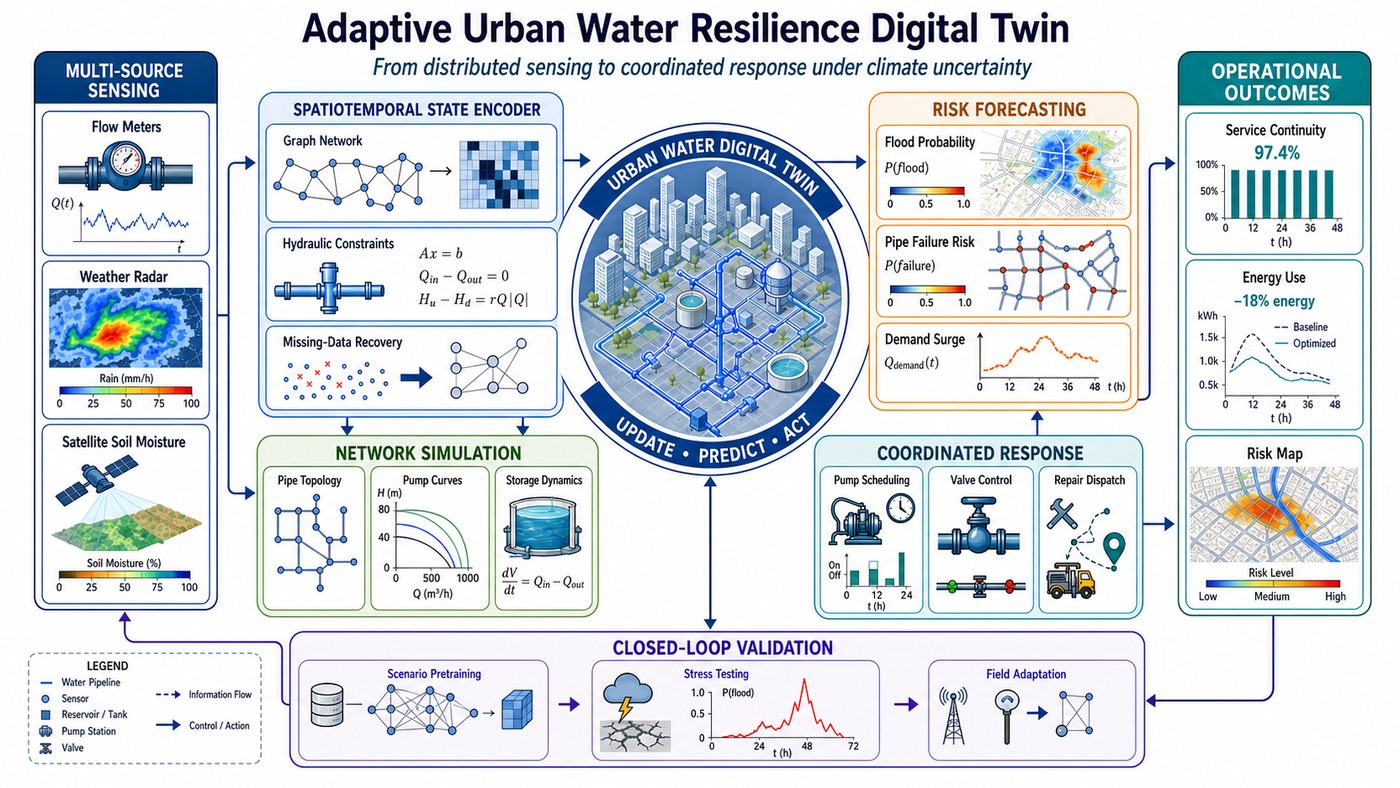
After conversion, we opened the generated file in Microsoft PowerPoint and used Select All. The screenshot below is intentionally busy: every selection outline reveals a separate PowerPoint object.
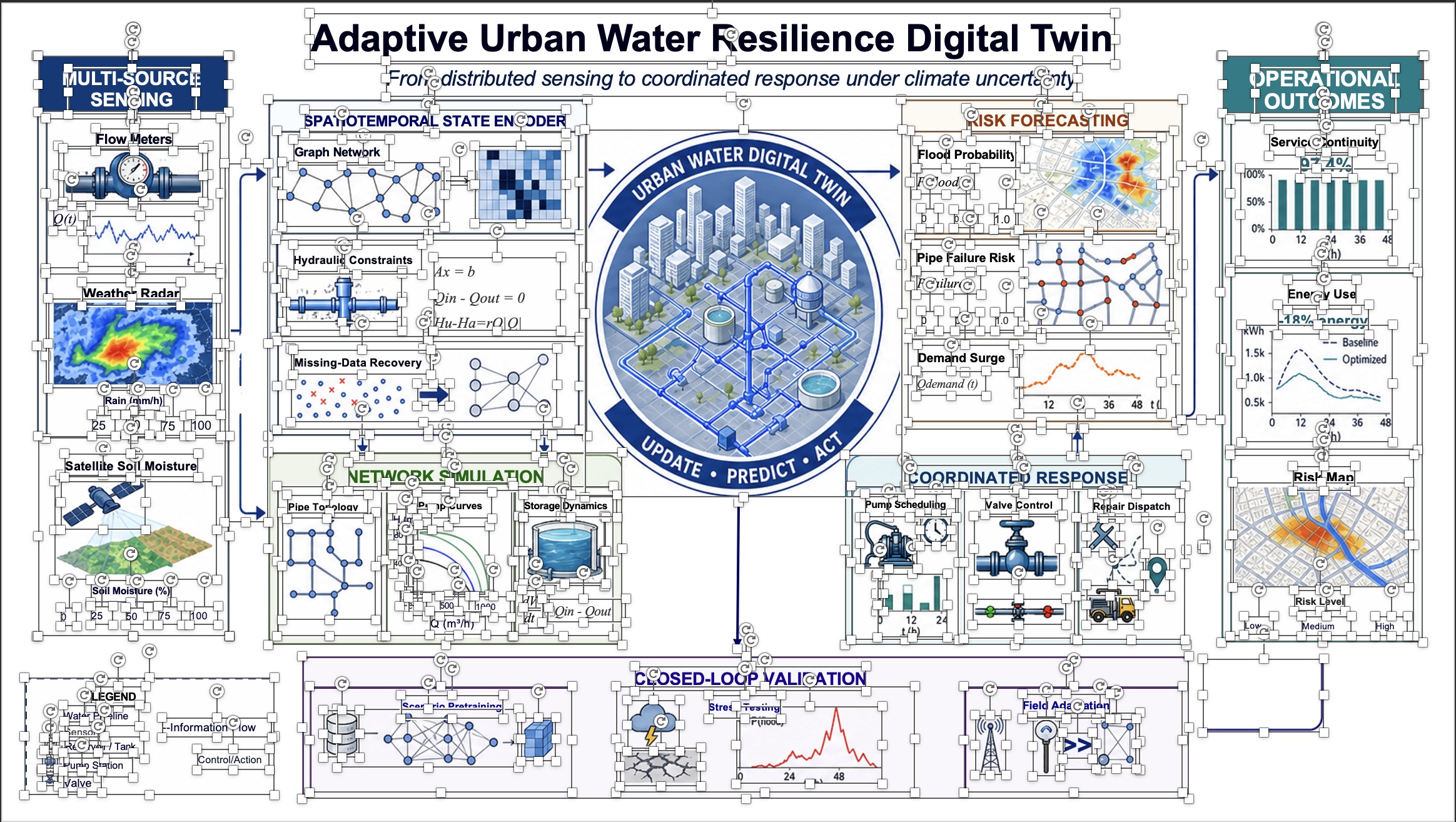
The 78 text boxes can be retyped. The 33 shapes can be moved, resized, or restyled. The 54 image objects preserve complex visual regions such as maps, diagrams, charts, and illustrations; their internal pixels are not editable, but each object can be repositioned, cropped, replaced, or removed independently.
The result is not perfect. A few connector regions retain cleanup residue, and some dense equation text is tighter than the source. Those misses matter, and they are why we show the full PowerPoint selection view rather than claiming pixel-perfect conversion. Even so, the page is no longer one inert picture. It is a working slide that can continue through review, correction, and client delivery.
What this changes about the AI presentation workflow
The old assumption was that a presentation model had to produce PowerPoint directly. That requirement forces visual creativity and document structure into the same generation step. A two-stage workflow separates them:
- Use an image model to explore and generate the strongest visual solution.
- Use reconstruction to recover editable text, layout, and independent visual objects.
- Finish the file in PowerPoint: correct copy, replace numbers, move elements, apply a logo, and deliver.
This does not make direct PPTX or HTML generation obsolete. Structured decks, repeated templates, and data-driven reporting still suit those approaches. The point is narrower: image generation removes the visual ceiling, and reconstruction removes the locked-image penalty. Together they make a class of slides possible that neither approach handles well alone.
The last mile is the product
Generating a beautiful image is impressive. Delivering a file that another person can revise on Monday morning is useful. That gap—between visual output and an editable working document—is where the remaining engineering lives.
Our goal with Image2PPT is to make that second half dependable: not to pretend every pixel can become a perfect native object, but to return the text and structure people need to change while preserving complex visuals faithfully. AI may have finally solved how a slide can look. The next problem is making that slide belong to the user again.
Turn an AI-generated slide image into editable PowerPoint
Upload one representative slide first. Open the result in PowerPoint, select the objects, and decide whether the recovered structure saves you from rebuilding it manually.