Pricing Blog
Try it free

Honest comparison

Image2PPT vs Codia NoteSlide: which image-to-PPT converter fits your workflow?

Both Image2PPT and Codia NoteSlide turn slide screenshots, AI-generated slide images, PDFs, and PPTX files into editable PowerPoint presentations in the cloud. Both also require signing in before converting your own files, so the practical differences come down to pricing transparency, per-page billing rules, ecosystem breadth, interface languages, and developer access.

Bottom line

Choose Codia NoteSlide if you want one broad design site offering 15 interface languages, 23 free browser-local image and PDF tools, AI photo editing, design-to-Figma workflows, and extra export formats (MP4, Word, HTML) alongside slide conversion. Choose Image2PPT if you want a focused slide converter with upfront pay-as-you-go per-page pricing (1 credit = 1 slide, no subscription), direct image-only PPTX inspection, PDF page-range selection, and a REST API plus Codex MCP integration sharing the same credit packs.

Side-by-side comparison

The table below compares verified workflow, pricing, input, output, language, and integration details from both sites.

Comparison item Image2PPT (image2ppt.com) Codia NoteSlide (codia.ai/noteslide/image-to-ppt)
Sign-in required to convert Yes, sign-in is required to run editable slide conversion. Separate browser-local tools (such as placing images into non-editable PPT slides, image/PPTX compression, and PDF to JPG) work without an account. Yes on NoteSlide: uploading your own image immediately prompts sign-in. Built-in sample decks can be previewed without signing in, and clicking Convert to Editable PPTX prompts sign-in. Codia's separate 23 browser utilities under codia.ai/tools/ require no account.
New-user free allowance 3 free credits on first sign-in (1 credit = 1 slide, valid for 7 days on accounts that have not purchased or redeemed credits; no card required). Pages flagged as complex require a paid account (any credit pack), still at 1 credit per page. The NoteSlide FAQ states that the Free plan includes 5 NoteSlide credits after signing up. How many credits each slide uses is not specified on the NoteSlide image-to-PPT page.
Published pricing & billing Pay-as-you-go credit packs, no subscription: 30 slides for $5.99 ($0.20/slide), 80 for $11.49 ($0.14/slide), or 200 for $24.99 ($0.12/slide). 1 credit = 1 slide; purchased credits remain valid long-term; failed slides refund automatically. NoteSlide links to Pricing and Enterprise pages in its header and mentions the Free plan with 5 NoteSlide credits; per-slide credit consumption and NoteSlide paid plan prices are not listed directly on the image-to-PPT page.
Supported inputs PNG, JPG, WebP, GIF, and PDF up to 35 MB per file, plus direct upload of image-only PPTX files up to 150 MB (browser reads locally and skips already-editable slides). Up to 50 pages per job, merged into one PPTX; PDF page-range selection supported. No video input. JPG, PNG, and WebP slide screenshots, photos, and scans, as well as PDF and PPTX. Multiple images can be combined into one deck. Dedicated pages also cover NotebookLM to PPT and image/Excel to chart workflows.
Output & editable elements Standard .pptx (opens in PowerPoint, Google Slides, Keynote, and LibreOffice Impress). Headlines, body text, numbers, and labels become native editable text boxes; suitable simple shapes (cards, rounded boxes, arrows, callouts) and structured tables become native PowerPoint shapes and tables; photos, detailed icons, and complex illustrations stay as crisp embedded images. Rebuilds slides into PPTX described on Codia's page as having editable text, shapes, and layout. Its FAQ also lists export to MP4, Word, and HTML.
Languages 4 interface languages (English, Simplified Chinese, Traditional Chinese, Japanese). Rebuilds slide text across English, Chinese (Simplified and Traditional), Japanese, Korean, major European languages, and right-to-left scripts such as Arabic and Hebrew. 15 interface languages in the site switcher (including English, Japanese, Korean, Simplified and Traditional Chinese, Spanish, Portuguese, German, French, Thai, Indonesian, Russian, and Arabic). NoteSlide states 109-language recognition.
Other entry points & tools Web app, public REST API (/api/v1) with official Python (image2ppt) and Node.js SDKs sharing the same credit balance (no separate enterprise plan), MCP integration for Codex App / ChatGPT developer mode / CLI, plus free local browser utilities. Hosted cloud web service (no offline desktop app or Figma plugin). Large multi-tool platform on codia.ai: 23 free browser-local image and PDF tools (compression, format conversion, resizing, color picker, PDF compression), AI image text editor, background removal, upscaling, SVG, Magic Layers, design-to-Figma converters, Codia Studio, Code, and Developer sections.

Competitor information is compiled from Codia's public website pages (codia.ai and codia.ai/noteslide/image-to-ppt) as of November 2026 and may have changed. Because we did not sign in to run paid NoteSlide conversions, this page does not rate Codia NoteSlide's conversion quality.

When Codia NoteSlide is the better fit

Codia is built as a broad visual-editing platform rather than a single-purpose slide converter. It makes more sense when your day-to-day work spans design assets beyond PowerPoint:

  • You want 23 free browser-local image and PDF utilities on the same site β€” compressing images to exact KB targets, converting WebP/PNG/JPG/SVG/HEIC, resizing for social formats, picking colors, or compressing PDFs without uploading files or creating an account.
  • Your team prefers working in one of Codia's 15 localized site languages, such as Spanish, French, German, Korean, Portuguese, Thai, Indonesian, Russian, or Arabic.
  • You regularly move between slides and design tools like Figma, Canva, Photoshop, or Sketch, or want AI photo tools (such as editing text inside a raster image while keeping it as an image, background removal, or upscaling) under one roof.
  • You want NoteSlide's preview of built-in sample decks before registering, or need extra export formats its FAQ lists such as MP4, Word, or HTML.

When Image2PPT is the better fit

Image2PPT focuses directly on turning flat slide images, PDFs, and image-only PPTX decks into editable PowerPoint with clear, predictable rules:

  • You want clear, published per-page pricing before you sign up: 1 credit = 1 slide, no subscription, starting at $5.99 for 30 slides ($0.20/slide) down to $24.99 for 200 slides ($0.12/slide), with purchased credits remaining valid long-term and failed pages refunded automatically.
  • You work with multi-page PDFs or image-only PPTX exports (such as NotebookLM or AI slide exports): select exact PDF page ranges up to 50 pages per job, or drop an image-only PPTX (up to 150 MB) so your browser locally inspects it and skips slides that are already editable.
  • You want native PowerPoint objects you can keep revising β€” headlines, body copy, numbers, simple shapes, and structured tables rebuilt as native PPTX elements, with photos and detailed graphics kept as clean images in place.
  • You want programmatic automation without an enterprise contract: buying any credit pack unlocks the public REST API (/api/v1) with official Python and Node.js SDKs using the same credit balance, and you can connect Image2PPT inside Codex or ChatGPT developer mode via MCP.

Practical differences to check before you pick

When two cloud converters both ask you to sign in first, the friction shows up in how you budget credits, prepare multi-page files, and connect conversions to the rest of your workflow.

Credit math you can calculate upfront

On Image2PPT, each slide costs 1 credit, and the credit counter is shown before you start a job. A 12-page PDF where you select pages 4 to 8 uses 5 credits. On Codia NoteSlide's public image-to-PPT page, the free tier states 5 NoteSlide credits, while the per-slide credit cost is not disclosed on that page β€” check their pricing screen before committing a large deck.

What happens before you sign in

On NoteSlide, selecting your own file immediately opens the sign-in dialog before you can preview or configure a conversion. On Image2PPT, you can drop your files to inspect slide count, page range, aspect ratio, and estimated credits first, and sign in when you are ready to run conversion β€” or inspect our real downloadable sample PPTX files below without creating an account.

Image-only PPTX files from AI tools

Many AI presentation tools now export a .pptx where each slide is still one flat picture. Image2PPT reads the .pptx locally in your browser (up to 150 MB), automatically selects full-slide pictures, skips slides that already contain editable objects, and uploads just the selected page images β€” up to 50 slides per job.

Developer API and AI assistant workflows

If your team generates slide visuals inside scripts, CI workflows, or AI coding tools, Image2PPT documents its full OpenAPI 3.1 spec, webhooks, and Python/Node.js packages publicly (pip install image2ppt or npm install image2ppt). Any credit pack activates API keys immediately with no monthly minimum.

Real Image2PPT conversion example

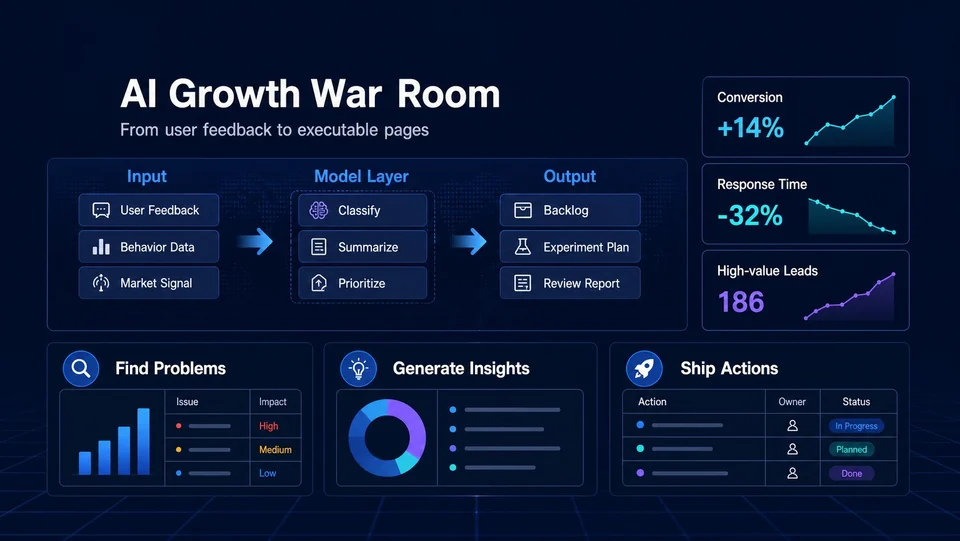
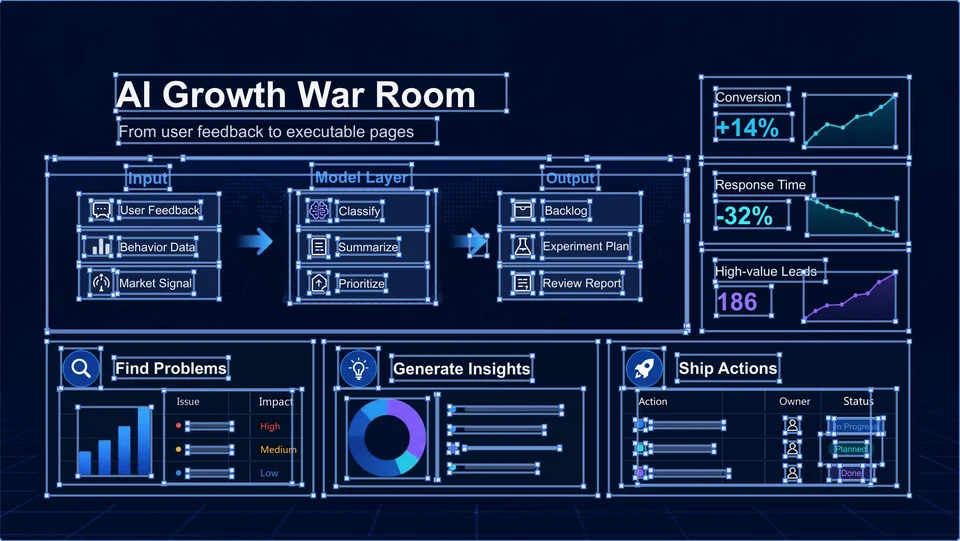
Rather than showing a mockup, here is a real slide converted with Image2PPT. The left side is the flat source image; the right side shows the converted PowerPoint with blue selection boxes around each separately editable element. Download the actual PPTX file to click into the text, KPI numbers, and shapes yourself.

Original AI growth command center slide image before conversion
Original slide image (single flat bitmap)
Image2PPT converted PPTX showing separately editable elements in blue boxes
Converted PPTX from Image2PPT (blue boxes highlight editable elements)

Frequently asked questions

Can I convert a slide without signing in on either Image2PPT or Codia NoteSlide?

Neither tool runs editable cloud conversion of your own slide without an account. On Codia NoteSlide, uploading your own image prompts sign-in immediately, though you can preview built-in sample decks before signing in. On Image2PPT, you can drop files to check page count and estimated credits first, then sign in to convert; Image2PPT also provides separate browser-local tools (such as placing images onto slides without text reconstruction) with no sign-in.

How do free trials compare between Image2PPT and Codia NoteSlide?

Image2PPT gives new accounts 3 free credits on first sign-in (1 credit = 1 slide, valid for 7 days if you have not purchased or redeemed credits), with pages flagged as complex requiring a paid account. Codia NoteSlide's FAQ states its Free plan includes 5 NoteSlide credits, though the NoteSlide image-to-PPT page does not list how many credits each slide consumes.

Does Image2PPT require a monthly subscription?

No. Image2PPT uses pay-as-you-go credit packs: 30 slides for $5.99, 80 slides for $11.49, or 200 slides for $24.99. Purchased credits remain valid long-term and do not reset monthly, and pages that fail to convert are refunded automatically.

Does Image2PPT also offer free browser image tools like Codia?

Codia offers a larger catalog of 23 browser-local image and PDF tools plus AI photo and Figma utilities. Image2PPT includes a focused set of 6 free browser-local utilities (image to non-editable PPT, image compression, PPTX compression, PDF to JPG, extracting PPTX images, and checking whether a PPTX has editable objects) that run locally without uploading files or signing in.

Which languages are supported on Image2PPT vs Codia NoteSlide?

Codia's website offers 15 interface languages and states 109-language recognition on NoteSlide. Image2PPT offers 4 interface languages (English, Simplified Chinese, Traditional Chinese, and Japanese) and rebuilds slide text across English, Chinese, Japanese, Korean, major European languages, and right-to-left scripts such as Arabic and Hebrew.

More comparisons and conversion guides

Try Image2PPT on one of your own slides

Upload a slide screenshot, PDF, or image-only PPTX and inspect the editable PowerPoint yourself. New accounts receive 3 free credits on first sign-in with no subscription required.

Start free trial
Last updated 2026-11-22. Competitor information is compiled from public website pages as of November 2026 and may have changed.