
JPG to Word Converter — keep the layout, edit the text
Convert JPG scans into editable Word text and tables. Upload images here, compare a real document sample, and check compression and OCR limits.
1 credit = 1 PPT page or 5 Word pages
Please upload files you have the right to use and are comfortable processing with an online tool. See our Terms.
A JPG is a photograph, not an editable document
A contract arriving as a JPG attachment may look complete while offering no text to select. Putting that attachment into Word only places the same photograph on a page. To change a name, reuse a clause or update a table, you need the writing recognized and the document structure rebuilt. Upload the original JPG here to create a DOCX with editable text, recognized headings and tables. Keep your original beside the result while you review it.
JPG and JPEG are two extensions for the same image format. Both are accepted. The useful distinction is how the file was made: a flat scanner image usually has different problems from a camera photo with shadows and perspective. Start with the sharpest original you have, rather than a smaller copy downloaded from a messaging app.
Prepare a compressed scan without losing more detail
JPG compression can leave blocks or pale halos around small letters. These artifacts become more noticeable when a file has been saved repeatedly. Renaming it to PNG does not bring the missing detail back. If you have a scanner or camera original, upload that version. Avoid taking a screenshot of the JPG preview, since this can reduce the number of pixels available for reading the page.
Zoom in before uploading. Check whether punctuation, decimal points and the strokes in similar characters remain distinct. Crop away unrelated background if needed, but retain the full text, page number and table edges. If the bottom of a letter was cut off in the source, conversion cannot recover the original wording reliably. A fresh scan is usually a better starting point than sharpening an already unreadable copy.
Convert several JPG pages into one Word document
Select the pages in their intended reading order. Each uploaded image counts as one page, and the upload list determines the order in the finished document. Review that list before you start. If it is wrong, clear the selection and choose the files again in the right order. This matters for a signed agreement where a missing schedule can be just as important as a missing paragraph.
Use one image per page. A photograph of an open book spread puts two pages, a curved gutter and often a shadow into the same image. Separate, flat captures make the reading order easier to check. For a document already stored as one scanned PDF, the scanned PDF to Word tool accepts that file directly; there is no need to export every page as JPG first.
Review the details that compression can hide
After downloading, compare names, dates, amounts, reference numbers and punctuation against the JPG. For a contract, inspect negative words and clause references as well as the obvious totals. A clean-looking paragraph can still contain a recognition error. Correct the wording in Word before you share the document or use it for a decision.
Recognized tables become editable Word tables. Check that labels match the correct amounts and that merged cells still describe the right rows. Try adding a row or editing a long cell to see how the page flows. Headings use Word styles and recognized clause numbering can continue when you insert another item. These editing checks tell you more than comparing two small thumbnails.
Layout and image content in the result
Word is a flowing document format. Editing a paragraph, changing a font or opening the file with a different font installed can move content onto another page. Review the whole file after making changes, especially a table near a page break. When a table of contents is present, update it in desktop Word after you finish editing so its page numbers reflect the current document.
Stamps, signatures, photographs and some complex content may remain images. Their presence in a DOCX does not make a signature editable text or authenticate the original document. Blurred writing, text hidden by a stamp and handwritten annotations need close review against the source. Keep the JPG originals with your working file so you can return to them when an unclear detail matters.
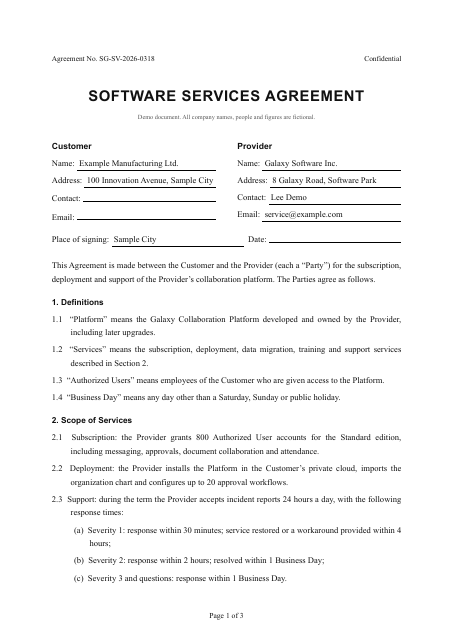
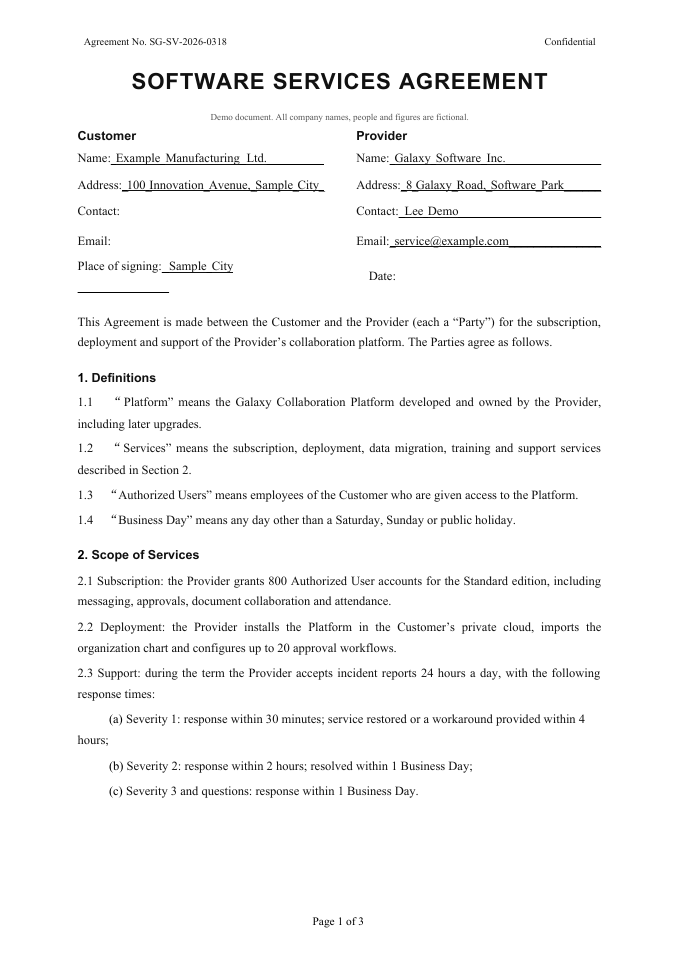
A real public sample: original and Word result
This is the existing public software services agreement sample, supplied as a PDF, not a camera photo or screenshot. The previews show the first page of that PDF and the actual, unedited Word output. They illustrate document structure and layout; they are not a separate JPG or PNG conversion test. Download both files to inspect the full document, including the recognized tables and headings.
Before you start and after you download
You can select files on this page; signing in is required before conversion starts. Each image counts as a page and uses page-based credits. Check the available balance in your account before starting. Upload only documents you have permission to process online. Keep the original until your edits have been reviewed. You can permanently delete a conversion and its files from your conversion history. For sensitive documents, review the privacy policy and remove unrelated personal information before uploading.
Frequently asked questions
Can I combine several images into one Word file?
Yes. Select images in page order; the upload list determines their order in the Word file. Each image counts as one page. Clear the selection and choose again if the order is wrong.
Will I get editable text or just pictures?
Recognized body text, headings and tables are editable. Stamps, signatures, photos and some complex content may remain images. Check blurred or obscured writing against the original.
Do I need an account to convert?
Yes. You can select files first, but you need to sign in before conversion starts. Your account shows your available credits and page allowance.
Related conversions
Pages and credits
1 credit = 1 PPT page or 5 Word pages
1 credit covers 5 Word pages; a partial group also costs 1 credit. Each document can contain up to 150 pages. If conversion fails or you stop it, all credits for the job are refunded. Word and PPT use the same credit balance.